


WeatherLink 2.0 Windows Software & USB Data Logger
Access, store and graph your weather data with WeatherLink 2.0
Add the USB Data Logger to your Vantage Vue/Vantage Pro2 console or Weather Envoy, and view data on your PC with the WeatherLink Computer Software or online at WeatherLink.com and WeatherLink Mobile Apps (iOS and Android).
The logger fits neatly into the weather station console or Envoy, storing weather data even when it's not connected to your PC.
Graph, Analyse and Store Your Data
View your data ON YOUR COMPUTER…
Simply plug the WeatherLink Data Logger into a wireless or cabled Vantage Pro2 or Vantage Vue console, or Weather Envoy. Download & install the WeatherLink Computer Software on your computer and start graphing, analysing and comparing your weather data.
Suitable for everyone from the home weather buff to the most demanding scientific user. Store weather data on your data logger even when it’s not connected to a computer.
… or GO ONLINE!
Keep your internet access and computer turned on 24/7, and start viewing your data ANYWHERE and ANYTIME in any major browser at WeatherLink.com and on your mobile phone with the WeatherLink Mobile App for FREE!
Graph, Analyse and Store Your Data
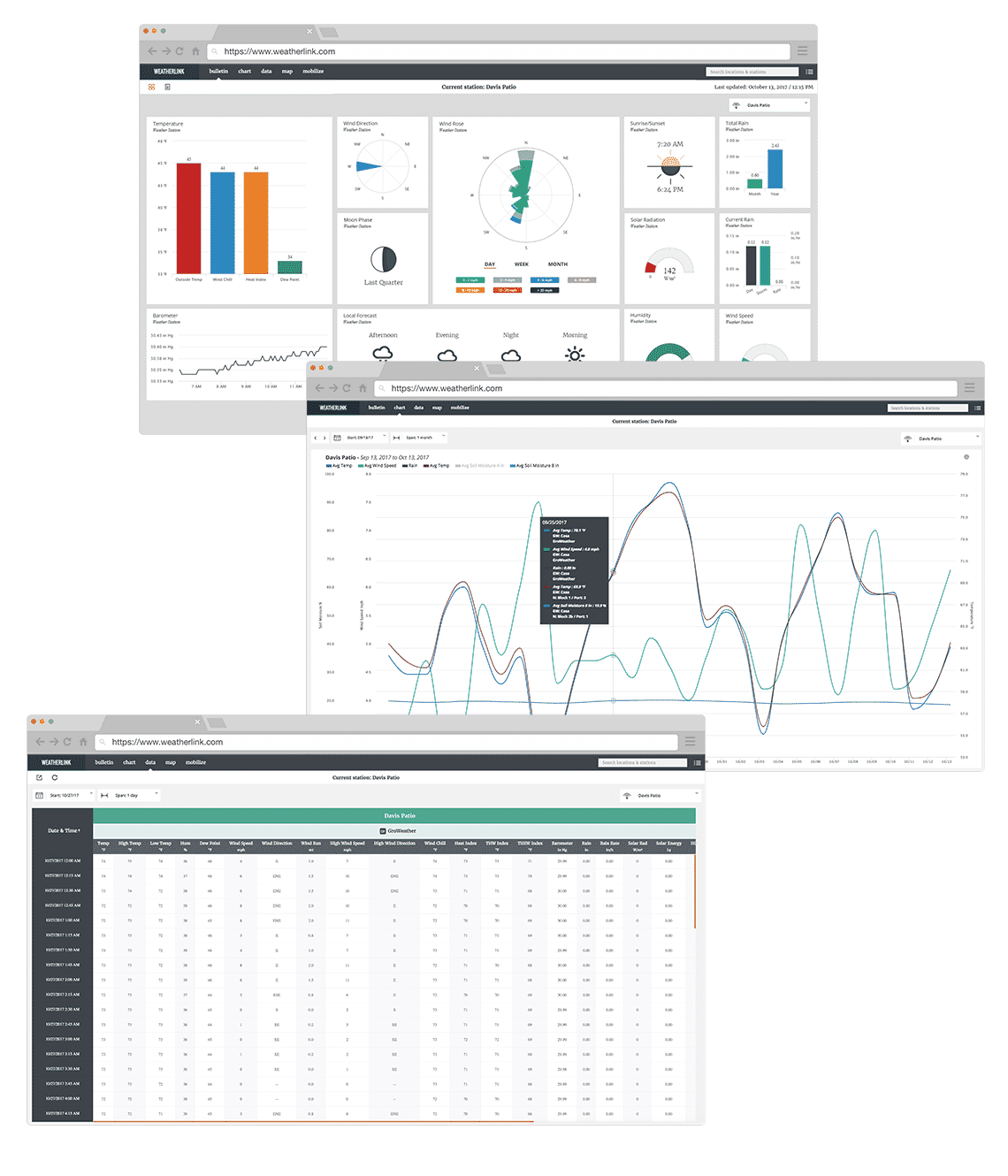
Your personal WeatherLink.com page gives you current condition readings for – Temperature, Humidity, Barometer, Wind Speed, Current Rain, Wind Direction, Total Rain, Rain Rate, Solar Radiation, Wind Rose, Local Forecast, Sunrise/Sunset, Moon Phase.
With an optional WeatherLink Pro subscription, you can also store, read and graph your historical data.
Data in Your Pocket
WeatherLink Mobile App brings your data and the Davis WeatherLink Network to your phone. Join the worldwide network of businesses, schools and hobbyists sharing their weather data with the world. WeatherLink lets you see your personal Davis Instruments weather station data and local forecasts, as well as explore other stations from around the world. Enjoy 7-day and hourly forecast, rain, barometer, solar radiation and many more.


Share Your Data
Upload
Upload your weather data to a growing list of third-party services including Weather Underground and CWOP (Citizen Weather Observer Program).
Embed
Embed iframe code into your personal website, customise your email signature with your weather data, or use the full screen option to display current conditions on a TV in the office or for public display.
Station links
Want to share your station data with a friend or the broader community without requiring them to log in? Share the Summary link or the Device URL to securely share your personal weather data.
Allow access
Pro and Pro+ upgrades allow you to share your personal weather station data and to allow access to historical data, charting, and other advanced features.
Data Storage in Data Logger
Standard Data Logger allows you to log and store data in the data logger, even when it’s not connected to your PC. Transfer the data as often as you like, or leave the PC and software running to transfer it automatically each day.
User-Selectable Storage Interval
You can choose 1, 5, 10, 15, 30, 60, or 120 minutes intervals and store up to six months worth of data on your Data Logger (depending on the storage interval).
Archive Storage Capacity
The amount of time before the archive on your Data Logger is completely filled:
1 Minute Archive Interval. . . . . . . . . . . . . . . . . . . . . 42 hours
5 Minute Archive Interval. . . . . . . . . . . . . . . . . . . . . 8 days
10 Minute Archive Interval. . . . . . . . . . . . . . . . . . . . . 17 days
15 Minute Archive Interval. . . . . . . . . . . . . . . . . . . . . 26 days
30 Minute Archive Interval. . . . . . . . . . . . . . . . . . . . . 53 days
60 Minute Archive Interval. . . . . . . . . . . . . . . . . . . . . 106 days
120 Minute Archive Interval. . . . . . . . . . . . . . . . . . . . . 213 days
Get Your Data to the Cloud
Requirements:
- PC turned-on 24/7
- WeatherLink Computer Software (included in the package) turned-on 24/7
- Internet access
- WeatherLink.com Account
WeatherLink Cloud stores 4x the amount of data your Data Logger can keep.
Data Updates:
- Your current conditions (Bulletin tab) are updated every 60 seconds.
- Your archive data (Data, Chart, Mobilize tabs) are uploaded to the server once an hour. (Example: WeatherLink USB Data Logger with 15-min interval setup will send up data every hour with 4 sets of readings. While a 30-min interval setup will be sent every hour with 2 sets of readings.)
Download Your Data from WeatherLink Cloud
- A feature built in your WeatherLink Computer Software allows you to download your data from the WeatherLink Cloud to your computer. Simply click on File > Download in your software.
- WeatherLink Cloud makes 4x the amount of data on your Data Logger available to you for download.
- You can download all your data as long as you do it periodically.
Please check the table below to determine how often you should download your data from the cloud to your computer to keep it all.
1 Minute Archive Interval . . . . . . . . . . . . . . . . . . . . . 7 days
5 Minute Archive Interval . . . . . . . . . . . . . . . . . . . . . 32 days
10 Minute Archive Interval . . . . . . . . . . . . . . . . . . . . 68 days
15 Minute Archive Interval . . . . . . . . . . . . . . . . . . . . 104 days
30 Minute Archive Interval . . . . . . . . . . . . . . . . . . . . 212 days
60 Minute Archive Interval . . . . . . . . . . . . . . . . . . . . 424 days
120 Minute Archive Interval . . . . . . . . . . . . . . . . . . . 852 days
Note that once your account capacity is reached, your data will get overwritten.
You can also download your data without the use of WeatherLink Computer Software in an easily-readable .csv format anytime from any computer with the use of any major browser with the ‘Data’ feature available in the paid Pro Tier plan.
Standard delivery (Royal Mail) - £3.95 to £4.99
Available for purchases under £200. Your order should be with you within 4-5 working days.
Tracked delivery - £5.95 to £6.50
Our tracked delivery is either Royal Mail tracked, Parcelforce or UPS. Your order should be with you within 1-2 working days.
Next Day service - £9.95
Place your order before 2:30pm Monday - Friday and receive your order the next working day (excludes Saturdays, Sundays and Public holidays). Orders placed at the weekend are shipped on the next working day and usually arrive the following day. Goods shipped on a next working day service may be subject to delays by the courier which are outside of our control. Services to outlying areas may differ and take longer and enhanced services may not be available.
International delivery
International delivery is available for this product. The cost and delivery time depend on country.
Collection
You can collect from our warehouse. Please call before visiting to ensure we have your order ready.
- Low stock - 6 items left
- Worldwide shipping